
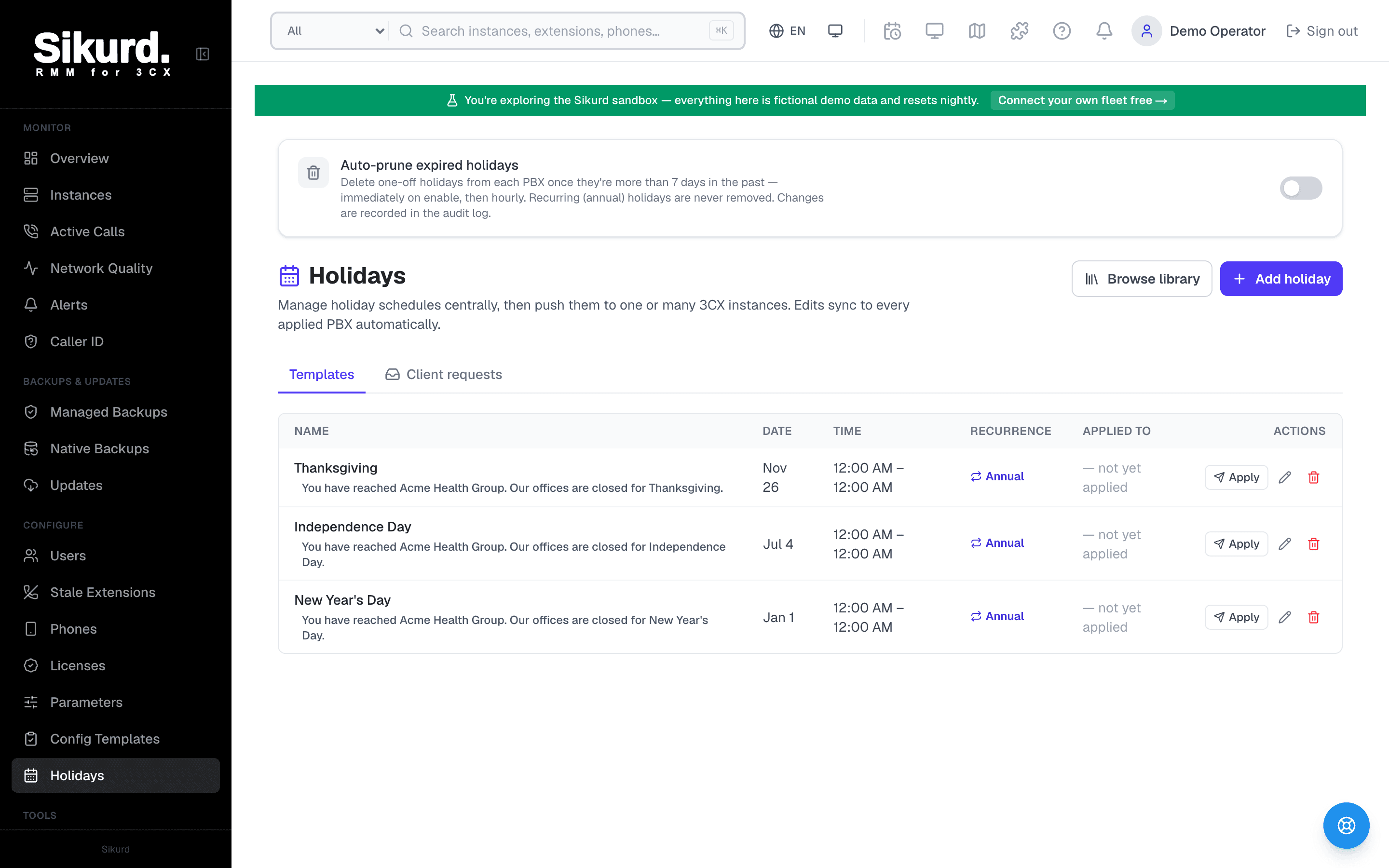
Auto-prune expired holidays
Delete one-off holidays from each PBX once they're more than 7 days in the past — re-checked hourly. Recurring holidays are never removed. Changes are recorded in the audit log.
Holidays
Manage holiday schedules centrally, then push them to one or many 3CX instances. Edits sync to every applied PBX automatically.
| Name | Date | Time | Recurrence | Applied to | Actions |
|---|---|---|---|---|---|
New Year's Day | Jan 1 | All day | Annual | 12 instances | Apply |
Memorial Day | May 26 | All day | Annual | 12 instances | Apply |
Independence DayAI greeting | Jul 4 | All day | Annual | 11 instances | Apply |
Labor Day | Sep 1 | All day | Annual | 12 instances | Apply |
ThanksgivingAI greeting | Nov 27 | All day | Annual | 12 instances | Apply |
Black Friday | Nov 28 | Closes 1:00 PM | 2026 only | 4 instances | Apply |
Christmas Eve | Dec 24 | Closes 2:00 PM | Annual | 9 instances | Apply |
Christmas Day | Dec 25 | All day | Annual | 12 instances | Apply |
Team Offsite | Mar 14 | All day | 2026 only | 1 instance | Apply |
The chore nobody schedules time for
Every MSP managing more than a handful of 3CX servers knows this drill. Thanksgiving is next Thursday, or the office is closing early on Christmas Eve, and now someone has to go into each customer's PBX, navigate to the right office-hours group, and add a holiday entry so the after-hours greeting and routing kick in on the right day. Twenty customers means twenty logins. Fifty means an afternoon.
And it's not a one-time setup. New customers onboard. Clients decide last-minute to close for a regional holiday you didn't have on your list. A one-off "closed for the team offsite" entry from last March is still sitting on the PBX, cluttering the schedule. The work never quite finishes — it just comes back around the next long weekend.
The fix is to stop treating each PBX as its own island. Sikurd's Holiday Scheduler turns "log into every server" into "manage one calendar," and then goes one step further: it lets your customers submit their own holiday hours, so you're approving requests instead of chasing emails.
How the Holiday Scheduler works
The model is deliberately simple: you author a holiday once on the Sikurd side, then apply it wherever you want. Sikurd keeps the template as the source of truth and remembers which Holiday it created on each PBX, so later edits and deletes target the right entry on the right server.
1. Build a template
A holiday template is just the holiday, described once:
- Recurring or one-offAn annual holiday like New Year's Day recurs every year (3CX stores it with no concrete year). A one-time "closed for inventory" is a single-date entry.
- Start and end date/timeFull-day or partial — close at noon on Christmas Eve, reopen the morning after Boxing Day. The times carry through to every PBX.
- An optional greetingAttach a WAV and Sikurd uploads it to each PBX's custom-prompt library on apply, then points the holiday at it so callers hear the right message. (Pair it with Voice Studio to generate one.)
2. Apply it to one PBX — or fifty
Pick the template, select your target instances, and push. For each one, Sikurd resolves that PBX's default office-hours group — looked up live by its IsDefault flag rather than a hard-coded group number, because that number genuinely differs between installs — and creates the 3CX Holiday there.
Crucially, you get a per-instance result, not a fire-and-forget. If a server was unreachable or not connected, Sikurd tells you "applied to 3 of 4" and lets you retry the one that failed. And re-applying a template you've already pushed is treated as a re-sync — Sikurd updates the existing Holiday in place rather than stacking duplicate entries on the PBX. Edit the template later and re-push; every instance stays in lock-step.
3. Clone from the curated library
Most holidays aren't bespoke — they're the public holidays for a country. Instead of looking up the date of the next bank holiday, Sikurd ships a curated Holiday Libraryyou filter by region group (North America, UK & Ireland, EU, Nordics, APAC), country, and year. Find the set you need and clone it into templates in a couple of clicks. The dates come pre-loaded; you decide where to apply them.
4. Keep it tidy automatically
One-off holidays accumulate. Sikurd has an opt-in auto-prune: turn it on and Sikurd deletes one-off holidays whose end date is more than a week in the past — across your whole fleet — and re-runs the sweep hourly so it stays clean. Recurring and annual holidays are never touched (they have no "past" to expire). Because pruning deletes on the live PBX, enabling it asks for a confirmation and runs an immediate first sweep, and every deletion is written to the audit log.
The part that actually saves you time: customers submit their own hours
Here's the workflow most MSPs don't realize is possible. The slow part of holiday management often isn't the clicking — it's the back-and-forth. "Are you closing for Good Friday?" "What are your hours the week between Christmas and New Year's?" You email the client, they reply three days later, you translate that into PBX entries.
Sikurd collapses that loop into a link. For any instance, you mint a public holiday-request link: a long, random, unguessable token — no login, no account for the client. You send it over. They open a clean, branded page (it shows your MSP name, so it looks like part of your service), pick their holidays from the curated regional library, and submit.
- You stay in control — it's a request, not a changeA client submission never touches the PBX. It lands in your inbox as a pending review. You approve it, and only then does Sikurd build the templates and apply them to that client's instance.
- Clients can't go off-scriptThe public form only offers the curated library — no free-text holidays. Submissions stay predictable, and a client can't invent an entry that breaks your routing.
- Scoped and safe by designThe link is tied to one instance. The client never sees a login, your other customers, billing, or any PBX setting. Links expire (you choose how long, up to 90 days) and stop accepting input once submitted, so a request can't be changed out from under the admin reviewing it.
- Unguessable, and quiet about failuresTokens are 32 bytes of randomness. A bad, expired, or already-used link returns the same generic "not available" response — an attacker fishing for valid links learns nothing.
The public submission page lives at a path like /holidays-request/<token>. Everything the client does there is logged on the instance's audit trail — link created, request submitted, request applied — so you have a clean record of who asked for what and when.
Why this matters at fleet scale
For a single PBX, doing holidays by hand is mildly annoying. Across a book of customers, it's a recurring tax on your team's time and a real source of "oops, we forgot to set the holiday and calls rang into an empty office" incidents — the kind that generate an angry call from the customer and an apology from you.
Centralizing the calendar removes the per-PBX logins. The library removes the date lookups. The customer links remove the email chase and, just as importantly, remove you as the bottleneck while still keeping you as the approver. Nothing reaches a customer's phone system without an admin signing off — but the busywork that used to surround that approval is gone.
Getting started
Holiday Scheduler is part of the core platform — there are no tiers and nothing about holidays is locked behind an upgrade. Your first three 3CX instances are free forever (the whole platform, not a trial), so you can wire up a few customers and run a real holiday through it before you pay for anything. Beyond three instances you're billed simply per instance.
A practical first run:
- Connect a couple of instancesAdd two or three customer PBXs so you can see a true multi-instance apply.
- Clone next quarter's holidays from the libraryFilter by your customers' country, clone the set, and apply to the relevant instances in one pass.
- Send one customer a request linkPick your most schedule-fussy client, mint a link, and let them submit their own hours. Approve it from your inbox and watch it land on their PBX.
- Turn on auto-pruneFlip it on once so last year's one-off entries clean themselves up going forward.
Related reading
- Best tools for managing multiple 3CX servers — where fleet-wide management fits in the bigger picture.
- How to monitor 3CX trunk health — catching problems before customers do, the monitoring side of the same job.
- 3CX monitoring for MSPs — the broader playbook for managing many PBXs from one place.