
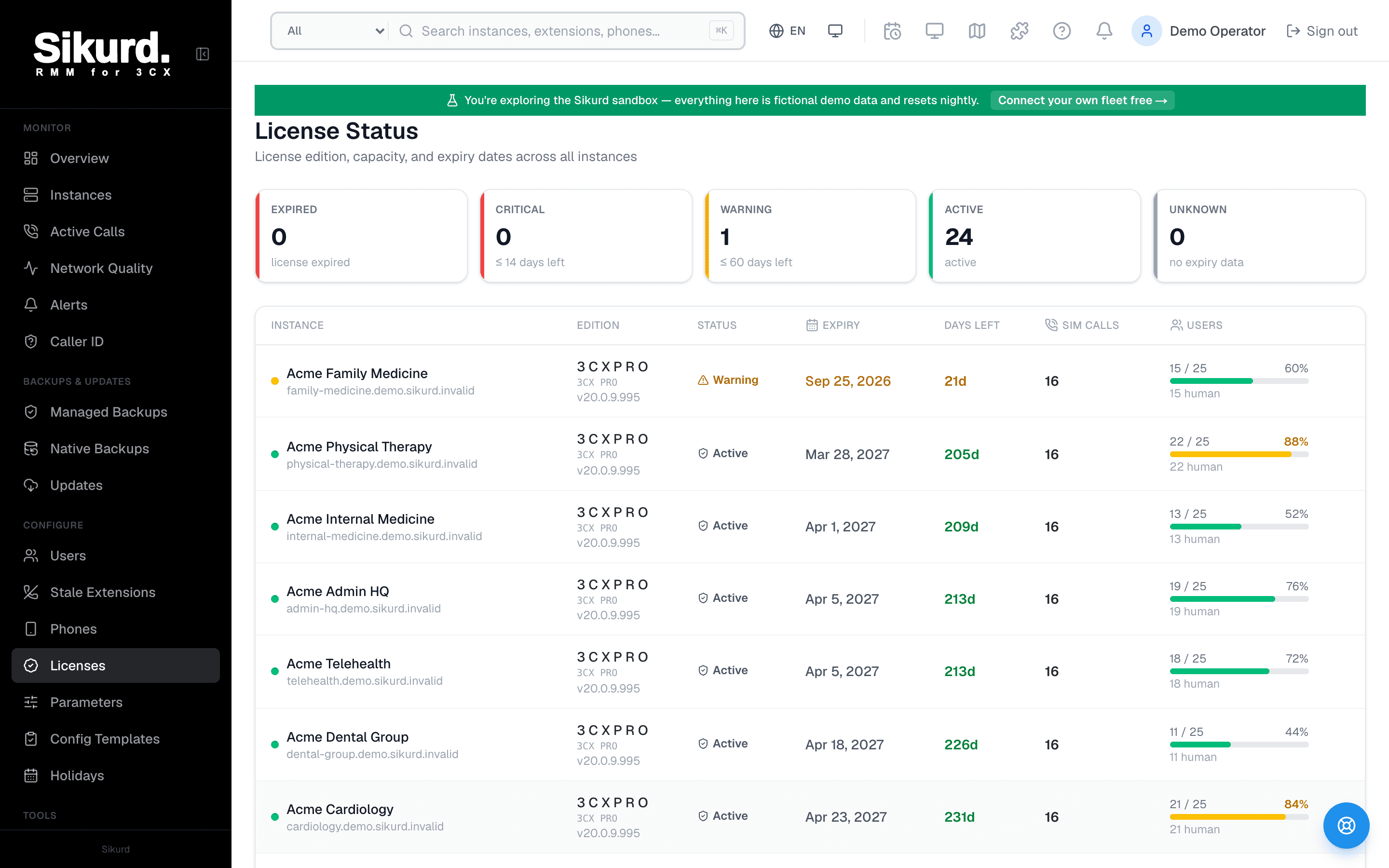
License Status
License edition, capacity, and expiry dates across all instances
Expired
license expired
Critical
≤ 14 days left
Warning
≤ 60 days left
Active
active
Unknown
no expiry data
| Instance | Edition | Status | Expiry | Days left | Sim calls | Users |
|---|---|---|---|---|---|---|
Northwind Cardiology northwind.3cx.us | Professional (SPLA) 8SGW-7XFG-2R4K-9Q1S Renew / buy3CXPSPROFSPLA v20.0.8.1131 | Critical | Jun 12, 2026 | 6d | 8 | 9 / 4023% 9 human · 0 AI |
Lakeside Dental Group lakeside.3cx.us | Professional (SPLA) JCDW-RV2L-P3D9-PX7H Renew / buy3CXPSPROFSPLA v20.0.8.1131 | Warning | Jun 30, 2026 | 24d | 16 | 43 / 8054% 43 human · 0 AI |
Summit Family Practice summit.3cx.us | Professional (SPLA) HZ7I-MQ8B-KV2Z-AM3Z Renew / buy3CXPSPROFSPLA v20.0.8.1131 | Active | Oct 14, 2026 | 130d | 32 | 54 / 19228% 54 human · 0 AI |
Harbor ENT Associates harbor-ent.3cx.us | Enterprise (SPLA) 9TIF-9RIQ-NB3O-HY5H Renew / buy3CXPSPROFENTSPLA v20.0.8.1131 | Active | Dec 7, 2026 | 184d | 32 | 87 / 19245% 87 human · 0 AI |
Meridian Orthopedics meridian.3cx.us | Enterprise (SPLA) K2PD-4WQX-7LM8-RV6T Renew / buy3CXPSPROFENTSPLA v20.0.8.1131 | Active | Jan 20, 2027 | 228d | 24 | 31 / 8039% 28 human · 3 AI |
Riverside Women's Health riverside.3cx.us | Professional (SPLA) QF3M-8BTN-2KD5-LW9P Renew / buy3CXPSPROFSPLA v20.0.8.1131 | Active | Mar 3, 2027 | 270d | 16 | 34 / 4085% 34 human · 0 AI |
Oakmont Dermatology oakmont.3cx.us | Professional (SPLA) TR6V-5NPK-9XQ2-MB4D Renew / buy3CXPSPROFSPLA v20.0.8.1131 | Active | May 19, 2027 | 347d | 16 | 18 / 4045% 18 human · 0 AI |
License Expiry Calendar
June 2026
October 2026
December 2026
January 2027
March 2027
May 2027
The problem with tracking license renewals across many PBXs
A 3CX license isn't a soft limit you can quietly run past. When it lapses, the PBX stops behaving like a healthy phone system — simultaneous calls get capped, and an outright expiry can take service down. For a customer, that reads as "the phones broke," and it lands as an emergency ticket on a day nobody scheduled.
For a single PBX this is easy to stay on top of: there's one date, and it's probably in your calendar. The failure mode is specific to scale. When you manage twenty, fifty, or a hundred customer instances — each with its own edition, its own expiry, its own seat count, possibly bought through different resellers at different times — there is no single date to remember. There's a long tail of them, and the one that gets you is precisely the one that fell off the spreadsheet: the client you onboarded eight months ago, the instance whose key you can't immediately place, the renewal that was "next quarter's problem" until next quarter arrived.
The usual coping mechanisms don't hold up. A shared spreadsheet of expiry dates is stale the moment a license is renewed or a customer adds seats, and nobody trusts it enough to act on it. Logging into each customer's 3CX console to check license status is exactly the kind of recurring chore that gets skipped under load. And native 3CX gives each PBX a view of its own license — there's no built-in pane that shows you all of them at once, ranked by who's about to lapse. So the work that protects you most (knowing your fleet's renewal posture before a customer does) is the work that's easiest to let slide.
The fix has the same shape every fleet problem does: consolidate the data into one place, sort it so the urgent thing is on top, and get told before a deadline instead of after. That's license management as an operations function, not a memory game.
The fleet License Status view: every license on one screen
The center of license management in Sikurd is a single License Status page that reads each connected instance's license off the PBX and lays the whole fleet out in one table. Every row carries the facts you actually need to make a renewal or capacity decision:
- License edition — the human-readable 3CX edition for that instance (retail, hosted/SPLA, and unknown variants all resolved to a consistent label), with the license key and version shown alongside.
- Expiry date — when that license lapses, rendered in your tenant timezone so the date matches the one your customer is on.
- Days left — the countdown, with overdue licenses shown explicitly as "Nd overdue" rather than a quiet negative number.
- Simultaneous-call limit — the licensed concurrent-call ceiling for that PBX, so capacity is visible next to the seat count.
- Seat / extension usage — a usage bar of extensions used vs. licensed, with the percentage and a human-vs-AI-user breakdown, so you can see who's running near their ceiling.
Two design choices make this a triage tool rather than a list. First, the table is sorted soonest-expiry-first: most-overdue at the very top, then whatever expires next, with instances that have no expiry data falling to the bottom. You never scroll to find the fire — it's already at the top of the page. Second, five status counters sit across the top and roll the fleet up at a glance:
- ExpiredThe license has already lapsed (or the PBX reports it expired). These are live incidents — phones may already be degraded.
- Critical14 days or fewer until expiry. Renew now; this is the band that turns into an Expired row if ignored.
- Warning60 days or fewer. On the horizon — get the renewal queued with the customer before it's urgent.
- ActiveComfortably in date. Nothing to do but keep an eye on seat usage.
- UnknownNo expiry data on record for that instance — worth investigating, because a missing date is its own risk.
The same bands drive the row coloring, so the table reads like a heat map: green is fine, yellow is "this quarter," red is "now," and an expired row is unmistakable. One screen answers the two questions that matter — what's about to lapse, and who's about to outgrow their license? — without logging into a single 3CX console.
The License Expiry Calendar: renewals grouped by month
Beneath the status table sits a License Expiry Calendar that takes the same data and reframes it for planning instead of triage. Instead of a flat list, it groups upcoming expiries by month — "June 2026," "July 2026," and so on, in chronological order — so a renewal workload becomes legible the way a calendar is. Each entry shows the instance, the customer, the FQDN, the license key, the exact expiry date, and a days-left badge.
This is the view you open when you're doing forward planning rather than firefighting: you can see that you have three renewals clustered in August and one straggler in November, decide whose you'll batch together, and reach out to those customers ahead of time. Where the status table answers "what's on fire right now," the calendar answers "what's coming, and how should I spread the work" — and clicking any entry jumps you straight to that instance.
One-click renew: deep-links into the 3CX partner shop
Spotting an expiry is only useful if acting on it is fast. So every row that has a known license key carries a "Renew / buy" button that deep-links directly into the 3CX partner shop for that exact license key — the standard partner renewal URL, pre-filled with the key, opened in a new tab so you keep your place in the fleet view.
To be clear about the boundary: Sikurd doesn't process the purchase. The renewal itself still happens in the 3CX portal, where your reseller account and partner pricing live — that's by design, because that's where the commercial relationship belongs. What the one-click link removes is the annoying middle step: figuring out which key belongs to which customer and navigating to the right place to renew it. You go from "this customer is about to lapse" to "the right renewal page is open" in a single click. And once you've renewed there, the "Refresh license" button on the instance pulls the new expiry back into Sikurd so the dashboard and the reminders reflect reality without waiting for the next poll.
License-expiry reminders: 10, 3, and 1 day out
The dashboard tells you the state when you look at it. Reminders are what make sure you don't have to remember to look. Sikurd fires license-expiry reminder alerts at three milestones ahead of each expiry date:
- 10 days out — INFOThe heads-up. "This license expires soon — plan the renewal." Enough runway to reach the customer and schedule it calmly.
- 3 days out — WARNINGAct this week. The window is closing and the renewal needs to actually happen now, not be planned.
- 1 day out — CRITICALYou have hours. This is the last call before the license lapses and the phones are affected.
A few details make these reminders trustworthy rather than noisy — and they're worth spelling out, because the difference between a useful alert and an ignored one is in exactly these mechanics:
- Calendar-day math in the tenant's timezone. "Days left" is computed as the difference between calendar dates in your timezone, not a UTC clock diff. A license that expires tomorrow at 9 p.m. Eastern reads as "1 day," the way you'd actually say it — not "2 days" because of a UTC overflow. The alert thresholds line up with the human mental model of "what day does this die."
- De-duplicated, one clean series per expiry. Each milestone fires once for a given expiry date. You get a tidy 10 → 3 → 1 progression, not the same warning repeated every poll. And because each reminder is keyed to a specific expiry date, the series is tied to this renewal cycle.
- Auto-resolving on renewal. Because the reminders are keyed to the expiry date, the moment Sikurd reads a new, later date, the old series no longer applies — a renewed license simply stops alerting. Hit "Refresh license" after renewing and any open license-expiry alert clears immediately once the new date clears the 10-day window, instead of lingering until the next poll.
- Routed like any other alert. License-expiry reminders flow through the same alert pipeline as the rest of your monitoring, so they can land wherever your other alerts do — your PSA, Slack or Teams, or an escalation policy — rather than living in a corner of the UI nobody checks.
A note on what these reminders are not, because over-claiming here would be misleading. The reminder series covers the license expiry date. It is not a seat-overage pager — Sikurd shows seat and call-capacity headroom on the dashboard so you can read it during a review, but it does not page you when an instance crosses a utilization threshold. And it's a license-date series, not a 3CX maintenance/support-contract countdown; maintenance status shows up as a flag that gates updates, not as its own dated alarm. The expiry reminders are the part that actively chases you; capacity and maintenance are things you check.
Why this beats a spreadsheet (or remembering)
The build-it-yourself alternative is a shared sheet of expiry dates that somebody updates by hand, cross-referenced against logging into each console when you remember to. That works for a handful of PBXs. Across a real fleet it produces the exact failure the whole industry keeps relearning: the sheet drifts out of date, nobody trusts it, the check that would have caught the lapse is the one that got skipped — and you find out a license expired because a customer's phones went down.
Consolidating license management closes that gap by default. Every instance's edition, expiry, simultaneous-call limit, and seat usage live on one screen, sorted so the next thing to lapse is on top. The calendar lets you plan renewals by month instead of reacting to them. One click takes you to the right renewal page for the right key. And a 10/3/1-day reminder series — computed on your calendar, de-duplicated, auto-resolving on renewal — makes sure the deadline finds you first. The work that "didn't get done consistently" becomes a glance at one page and an alert you can't miss.
Adjacent reading
- Best tools for managing multiple 3CX servers — the broader fleet-management picture license management lives inside.
- Scheduled, backup-protected 3CX updates — why a lapsed maintenance flag matters at patch time, and how to patch a fleet on a window.
- Smart 3CX alerts with auto-resolve — how the alert pipeline that delivers these reminders dedupes and self-resolves.